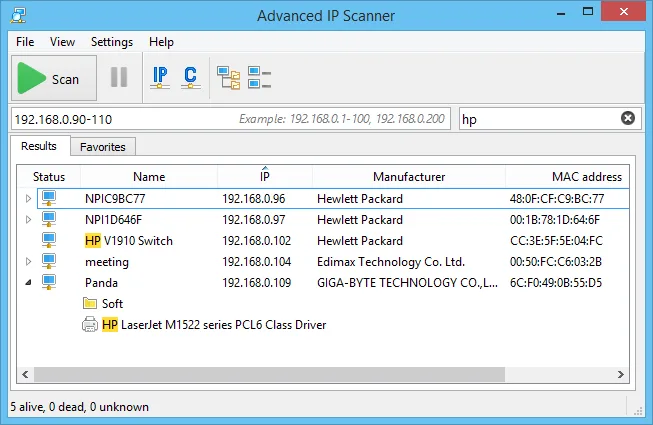
It is Monday, the office was powered down for electrical work over the weekend, and half the desktops in accounting did not come back. You want to see which machines are up, wake the ones that are not, and RDP into the one that is showing a Windows Update screen, all without opening four consoles. Advanced IP Scanner is the tool many Windows admins reach for in that moment, because the results list is also the control panel. As always with scanners, point it only at networks you own or have explicit authorization to manage.
What it does
Advanced IP Scanner is a free Windows network scanner from Famatech Corp., the company behind the Radmin remote-control product. Give it one or more ranges (for example 192.168.10.1-254, 10.0.5.0/24), press Scan, and it lists responding devices with name, IP, manufacturer and MAC address. Expanding a host shows its shared folders along with any HTTP, HTTPS or FTP services it found.
The results list is actionable. According to the vendor’s help pages, you can:
- connect via RDP or Radmin directly from the context menu;
- send a Wake-on-LAN magic packet to selected machines;
- remotely shut down or reboot hosts, with an optional warning message;
- open found web or FTP services in a browser, and open shares in Explorer;
- launch ping, tracert, telnet or SSH against a host;
- keep a Favorites list of machines you check often;
- export results to CSV, HTML or XML.
The vendor lists compatibility with Windows 11, 10, 8 and 7, and states that no installation is required; the package offers a run-without-install path as well as a normal install. The vendor’s pages that were checked for this review do not print a version number, so confirm the current build on the product page itself.
Where it’s strong
- Actions from the grid. Shutdown, Wake-on-LAN and RDP from one right-click is the reason it stays on so many admin laptops. For a small office, that replaces a handful of separate utilities.
- Readable output. Manufacturer names from the MAC OUI make it easy to spot the one Ubiquiti AP or the rogue consumer router in a list of Dell desktops.
- Share visibility. Folders shared from each host appear in the tree, which helps with quick “who is sharing what” checks, though it does not test write access.
- Low friction. Running without installing is useful on a technician’s USB stick or on a client’s PC that you should not leave software on.
Where it comes up short, and who should leave it in the drawer
It is Windows only. If part of your team works from macOS or Linux, they need a different tool, and you lose a shared export format. It has no command-line interface for scheduled, scripted sweeps, so it is a hands-on-keyboard tool rather than something you run nightly from Task Scheduler.
It does not do general port scanning in the sense of “check these twenty TCP ports on every host”. It detects a few service types (HTTP, HTTPS, FTP, RDP, Radmin) and stops there. If you need to find every host listening on 445 or 3389 across a range, use Angry IP Scanner with a custom port list. It also does not evaluate share permissions; for an access audit, LizardSystems Network Scanner tests read/write for a named account.
The Radmin integration is a sales channel as much as a feature. It is harmless, but if your remote-support standard is something else, that part of the menu is dead weight. Finally, Wake-on-LAN only works when the NIC and BIOS/UEFI are configured for it and the magic packet can reach the broadcast domain; across routed VLANs you need directed broadcast or a relay, which is a network design question rather than a tool feature.
Skip it if you need cross-platform coverage, scripting or compliance-grade reports.
Who it suits
Windows admins and helpdesk technicians in small and mid-size offices who want to find, wake, reach and reboot machines quickly on their own LAN. It is also a reasonable choice for an MSP technician doing an on-site visit, provided the client has authorized the scan. If your weekly routine includes “which PCs are off, turn them on for patching”, this is a good fit.
Licensing and cost
At the time of writing, the vendor describes Advanced IP Scanner as free, with no paid tier listed on its site. It is proprietary freeware, not open source. The product pages checked for this review do not include a separate statement about commercial use; the site markets it to IT professionals, but if your organization requires a written licence position for every tool, read the licence agreement shown during first run or contact Famatech support. Pricing and terms can change, so check the vendor’s site before rolling it out widely.
How it compares
Its closest peer on this site is Angry IP Scanner. The quick version: Advanced IP Scanner wins on Windows-native actions (RDP, Wake-on-LAN, shutdown) and polish; Angry IP wins on cross-platform support, configurable port checks and a CLI. The full breakdown is in Angry IP Scanner vs Advanced IP Scanner. If the next step after finding a host is a remote shell on a switch or a Linux box, PuTTY picks up from there, and when you need to see what a misbehaving device is actually sending, Wireshark does the packet-level work. More options are grouped under LAN & Port Scanners.
Getting it safely
Get it only from advanced-ip-scanner.com. The name is widely imitated, and look-alike domains have been used to push tampered copies, so check the domain in the address bar before you run anything. After fetching, open the file’s Properties and check the Digital Signatures tab, or run:
Get-AuthenticodeSignature .\<package-name>.exe | Format-List Status, SignerCertificateThe signer should be Famatech. If the status is anything other than Valid, delete the file. Our where to get it page covers the wider routine.
FAQ
Is Advanced IP Scanner free for business use?
The vendor presents it as free with no paid edition. For a formal licence position, read the agreement shown at first run or ask Famatech directly.
Does it work without installing?
The vendor states no installation is required; you can choose to run it directly rather than install it.
Why does Wake-on-LAN not wake some machines?
The target NIC must have WoL enabled in both firmware and the Windows driver, the machine must have standby power, and the magic packet must reach its broadcast domain. Across routers you need directed broadcast or a relay.
Can it scan multiple subnets at once?
Yes. Enter several ranges separated by commas and it will sweep them in one pass.
Does it run on macOS or Linux?
No. The vendor lists Windows 11, 10, 8 and 7 only.