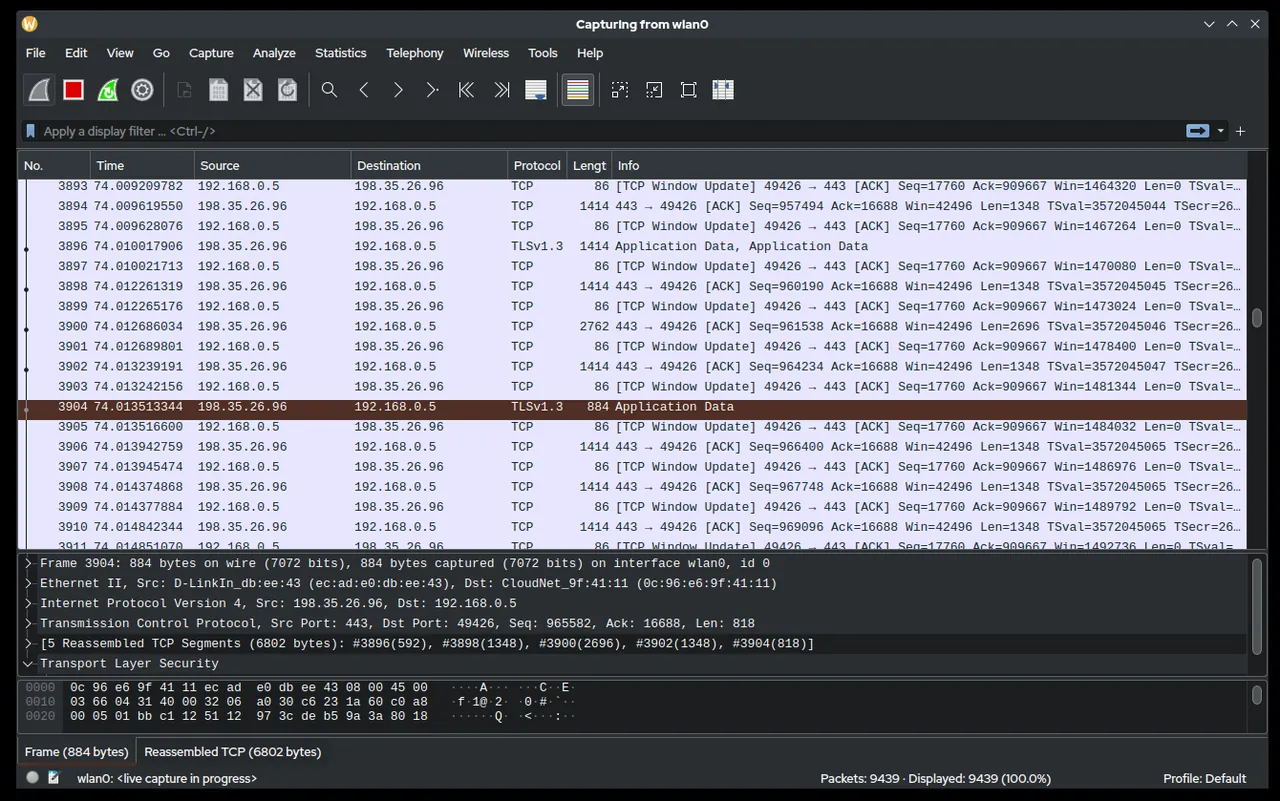
Users on the third floor say Teams calls drop every few minutes. The switch shows no errors, the firewall logs look clean, and the ISP says the circuit is fine. At some point, every admin reaches the step where opinions stop and packets start: mirror the port, capture the traffic, and look at what is actually happening between the client and the server. Wireshark is the tool for that step, and it is free. Capture only on networks and systems you own or are authorized to monitor, because packets can contain credentials and personal data.
What it does
Wireshark is a network protocol analyzer maintained by the Wireshark Foundation, a non-profit organization, and released under the GNU General Public License version 2. It captures live traffic from an interface, or opens capture files made elsewhere, and decodes each packet layer by layer: Ethernet, VLAN tags, IP, TCP/UDP, and application protocols such as DNS, DHCP, SMB2/3, Kerberos, LDAP, HTTP, TLS handshakes, SIP and RTP. The vendor states it runs on Windows, macOS, Linux and UNIX.
The parts admins use most:
- Capture filters (BPF syntax), applied before packets are stored:
host 10.0.10.25 and port 445. - Display filters, applied afterwards, with protocol fields:
dns.flags.rcode != 0,tcp.analysis.retransmission,smb2.nt_status != 0,dhcp.option.dhcp == 1. - Follow Stream to reconstruct a TCP, UDP or TLS conversation.
- Statistics: Conversations, Endpoints, Protocol Hierarchy, I/O Graphs and Expert Information, which flags retransmissions, zero windows and resets.
- Command-line tools:
tsharkfor headless capture and analysis,dumpcapfor long-running captures with ring buffers, andeditcap/mergecapfor trimming and joining files.
On Windows, capture relies on the Npcap packet capture driver, which the Wireshark package offers to install. At the time of writing, the current stable release is 4.6.9 and the old-stable branch is 4.4.19, both published on September 23, 2026. The project notes that this release fixes many vulnerabilities, reflecting a recent rise in AI-assisted vulnerability reports.
Where it’s strong
- Ground truth. When DHCP leases fail, a capture shows whether the DISCOVER left the client, whether an OFFER came back and from which server. That ends a lot of arguments.
- Protocol coverage. Its dissectors cover far more protocols than any commercial tool a small IT shop is likely to buy.
- Filters that scale. A display filter such as
tcp.analysis.flags && ip.addr==10.0.30.0/24cuts a million-packet capture down to the dozen that matter. - Headless capture.
dumpcap -i 2 -b filesize:100000 -b files:20 -w C:\cap\core.pcapngkeeps a rolling 2 GB buffer on a mirror port until the intermittent problem happens again. - Cross-platform. The same capture file opens on a Windows workstation, a Mac or a Linux jump box.
Where it comes up short, and who should leave it in the drawer
You can only capture what reaches your interface. On a switched network that means a SPAN/mirror port, a network TAP, or capturing on one of the endpoints. Plugging a laptop into a random access port will show broadcast traffic and your own packets, and little else. Wi-Fi capture in monitor mode depends heavily on the adapter and OS, and is limited on Windows.
The learning curve is real. The interface exposes everything, and new users drown in packets. Without a clear question, such as “is the server sending a TCP reset?” or “does DNS answer within 50 ms?”, a capture seldom helps.
Encrypted traffic is opaque by design. You will see TLS handshakes, SNI and timings, but not payloads, unless you control an endpoint and can export session keys. Captures also carry sensitive data, so they need the same handling as logs with personal information, and some organizations require change approval before capturing on production.
If you just need to know which hosts are alive or which ports are open, Wireshark is overkill; a scanner is faster. If you need to know which process on a Windows server owns a connection, TCPView from the Sysinternals Suite answers that directly.
Who it suits
Network admins and Windows/Linux sysadmins who troubleshoot DHCP, DNS, authentication, SMB performance, VoIP quality or application timeouts; security teams investigating suspicious traffic on their own networks; anyone preparing evidence for a vendor support case, where a .pcapng file often speeds up the ticket.
Licensing and cost
Wireshark is free software under GPLv2. There is no licence fee, no per-seat cost and no paid edition, so it can be deployed on every admin machine. The project is backed by sponsors, and nothing about sponsorship affects your right to use the software. On Windows, Npcap has its own licence terms, which are separate from Wireshark’s; review them if your organization redistributes Npcap internally. Check the vendor’s site for the current position.
How it compares
Wireshark sits at the end of a typical troubleshooting chain on this site. A sweep with Angry IP Scanner or Advanced IP Scanner tells you what is on the network; PuTTY gets you onto the switch to set up a mirror port (monitor session 1 source interface Gi1/0/12 on many Cisco IOS switches); Wireshark then shows what those devices are saying. For the process-level view on a Windows host, pair it with Sysinternals. More tools are listed under Diagnostic & Planning Utilities.
Getting it safely
Get Wireshark only from wireshark.org. The project publishes SHA-256 hashes for each release in its signatures file, and the Windows packages are code-signed, so check the signature as well as the hash. Verify before running:
Get-FileHash .\<wireshark-package>.exe -Algorithm SHA256Compare the result with the value listed for that exact version on the vendor’s site. Avoid bundles from shareware sites, which often lag behind security releases. See where to get it for the general checklist.
FAQ
Do I need admin rights to capture?
On Windows, installing Npcap needs admin rights; after that it can be configured to allow capture without elevation or to restrict capture to administrators. On Linux, grant capture rights to dumpcap rather than running Wireshark as root.
Why can’t I see other people’s traffic?
Switches forward unicast frames only to the destination port. Use a SPAN/mirror port, a TAP or capture on an endpoint.
Can it decrypt HTTPS?
Only if you control an endpoint and export TLS session keys, for example through the SSLKEYLOGFILE variable for supported browsers.
What is the difference between tshark and dumpcap?
dumpcap only captures and writes files, which makes it light and reliable for long runs. tshark captures and dissects, useful for command-line analysis.
Which version should I run?
The current stable branch (4.6.x at the time of writing) unless a vendor or policy requires the old-stable 4.4.x line.