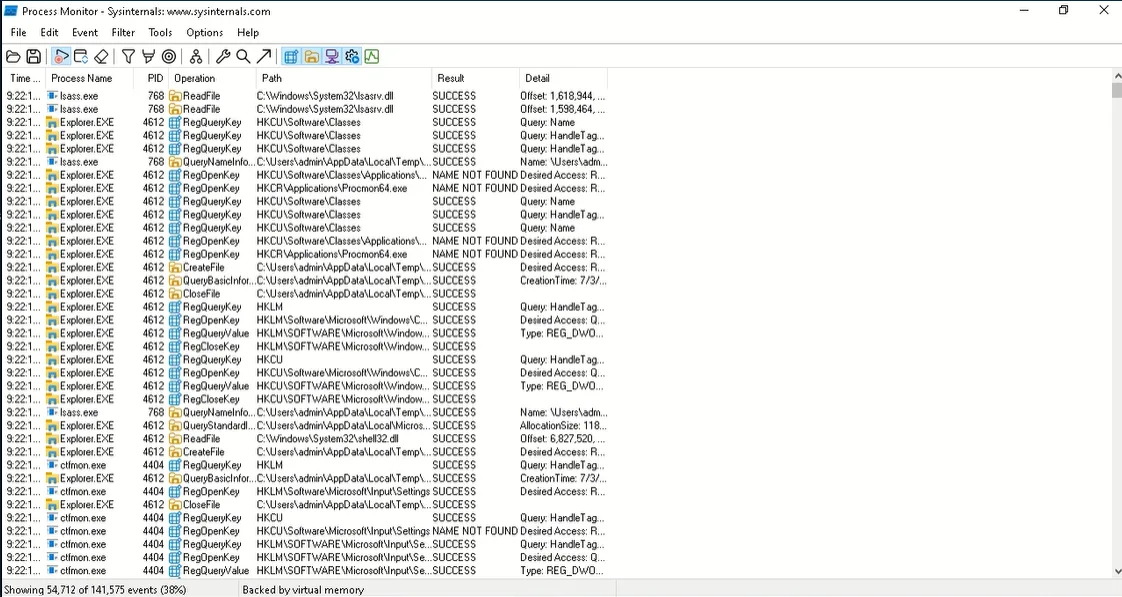
A file server starts refusing connections every afternoon around three. Event Viewer has nothing useful, Task Manager shows a busy System process, and the application team swears nothing changed. The answer is usually in the details Windows does not surface by default: which process holds a handle to the locked file, which service opens a thousand TCP connections, which scheduled task relaunches at 14:55. The Sysinternals Suite is where Windows admins go for those details, and it has been for decades.
What it does
Sysinternals began in 1996 as Mark Russinovich’s site for advanced system utilities, and the tools are now published by Microsoft on Microsoft Learn. The Suite rolls the troubleshooting utilities into one package. The vendor’s list runs to several dozen tools; the ones most relevant to a LAN admin are:
- Process Explorer — Task Manager with depth: process tree, handles, DLLs, per-process TCP/IP, and VirusTotal lookups.
- Process Monitor — real-time file system, registry and process/thread activity with filters. Version 4.1 (August 2026) added an IPC event class for named pipes and mailslots.
- Autoruns — every autostart location in one place. Version 14.3 (June 2026) brought the command-line
autorunscin line with the GUI. - PsExec and PsTools — run commands on remote systems, list services, kill processes, read event logs:
psexec \\srv-fs01 -s ipconfig /all. - TCPView — live list of TCP and UDP endpoints per process.
- PsPing — ICMP, TCP and latency/bandwidth tests, such as
psping -n 50 10.0.0.10:445to test SMB reachability without ICMP. - AccessChk, AccessEnum and ShareEnum — effective permissions on files, registry keys and shares.
- Sysmon — a service and driver that logs process creation, network connections and more to the event log.
- BgInfo, RDCMan, ZoomIt, Sigcheck, Handle, ProcDump and many others.
The Suite page was last updated on September 10, 2026. Microsoft offers the full package (about 192 MB), a smaller Nano Server build, an ARM64 build and a Microsoft Store listing. There is also Sysinternals Live, which lets you run a single tool straight from \\live.sysinternals.com\tools\procmon.exe without copying the whole Suite.
Where it’s strong
- Depth nobody else matches for free. Process Monitor and Process Explorer answer questions that no built-in Windows tool does, and they are the reference tools many support articles assume you have.
- Remote administration from the command line. PsExec, PsService, PsLogList and PsLoggedOn cover a lot of day-to-day remote work, especially in environments where PowerShell remoting is not enabled everywhere.
- Security triage. Autoruns with VirusTotal checks, Sigcheck for signature verification and Sysmon for logging are standard parts of incident response on Windows.
- Active development. Several tools were updated in 2026 alone, including Process Monitor, Autoruns, ProcDump, Sysmon, RDCMan and NotMyFault.
- Sysinternals Live. On a locked-down server, pulling one tool over SMB/WebDAV from live.sysinternals.com avoids copying dozens of binaries.
Where it comes up short, and who should leave it in the drawer
It is a toolbox, not a product. There is no central console, no inventory and no reporting; each tool does one job and leaves the interpretation to you. Process Monitor in particular produces millions of events per minute on a busy server, and without filters it will fill memory quickly. Learn the filter and “drop filtered events” options before running it on production.
PsExec is powerful and therefore watched. Many EDR products flag it because attackers use it too, and it needs admin rights plus SMB (TCP 445) and the ADMIN$ share on the target. In hardened environments, you may need a documented exception, or use PowerShell remoting over WinRM (5985/5986) instead.
It is almost entirely Windows-focused. Microsoft publishes a few tools for Linux and macOS, but they are not in the Suite. And it is not a network scanner: it will tell you what a single machine is doing on the network, not which machines are on the network. For that, use Angry IP Scanner or Advanced IP Scanner.
The licence is not open source, which matters if your policy requires source-available tools.
Who it suits
Any Windows administrator, full stop, but particularly those who troubleshoot servers, investigate suspicious processes or support desktops remotely. Security teams will get the most out of Sysmon and Autoruns; helpdesk staff will lean on Process Explorer and TCPView.
Licensing and cost
The tools are free of charge under the Sysinternals Software License Terms. Those terms let you install and use any number of copies on your devices. They do not allow publishing the software for others to copy, renting it out, reverse engineering it or using it for commercial software hosting services. The licence also states that the tools do not collect any data, and warns that files saved by the tools (for example, Process Monitor logs or dumps) may contain sensitive information such as usernames or paths. Treat those files as confidential. There is no paid edition or support contract. Check Microsoft’s licence page for the current wording.
How it compares
Nothing replaces the Suite outright. Wireshark overlaps with TCPView only at the edges: TCPView shows which process owns a connection, Wireshark shows what is inside the packets. For share auditing, ShareEnum and AccessEnum are quick, while LizardSystems Network Scanner sweeps whole ranges and tests access as a chosen account. See all related tools in Diagnostic & Planning Utilities.
Getting it safely
Obtain the Suite from Microsoft Learn (learn.microsoft.com/sysinternals), the Microsoft Store listing, or live.sysinternals.com. Every binary is signed by Microsoft; after extracting, you can check the whole folder with the Suite’s own Sigcheck:
.\sigcheck64.exe -accepteula -nobanner -e -u -s C:\Tools\SysinternalsWith -u, it lists only files that are unsigned or unknown, so an empty result is what you want. Ignore bundled “Sysinternals packs” from third-party sites. The where to get it page covers general verification steps.
FAQ
Is Sysinternals free for business use?
Yes. The licence terms let you install and use any number of copies on your devices at no charge, with no separate commercial edition.
Why does my EDR block PsExec?
PsExec is also used by attackers for lateral movement, so many security tools alert on it. Arrange an approved exception or use PowerShell remoting.
Can I run a tool without installing anything?
Yes. Most tools are standalone executables, and Sysinternals Live lets you run them from \\live.sysinternals.com\tools\.
Does Process Monitor slow down a server?
It can on a busy system. Apply filters before capture and enable dropping filtered events to limit memory use.
Is there an ARM64 version?
Yes. Microsoft publishes a separate ARM64 build of the Suite.