The new building gets a /23 from the core, and the project lead wants voice, staff, guest, cameras and building management on separate VLANs, each with room to grow. You can do the arithmetic on a whiteboard, and most admins can, but the mistakes come at 4 p.m.: a subnet that overlaps the next one by a single address, a broadcast address typed in as a gateway, a DHCP scope that runs past the boundary. LanCalculator from LizardSystems is a desktop calculator built to take that arithmetic off your hands and hand back lists you can paste into switch configs and IPAM notes.
What it does
LanCalculator is a Windows application for IP address calculations. According to the vendor, it supports all IPv4 and IPv6 address formats, accepts either subnet masks (255.255.254.0) or prefix lengths (/23), and works out the values you would otherwise compute by hand, such as network and broadcast addresses and the usable host range. It detects the network type of an address, performs reverse DNS lookups, and can display addresses in binary, octal, decimal or hexadecimal, which is handy when you are explaining why 10.20.31.255 is not a valid host in a /23.
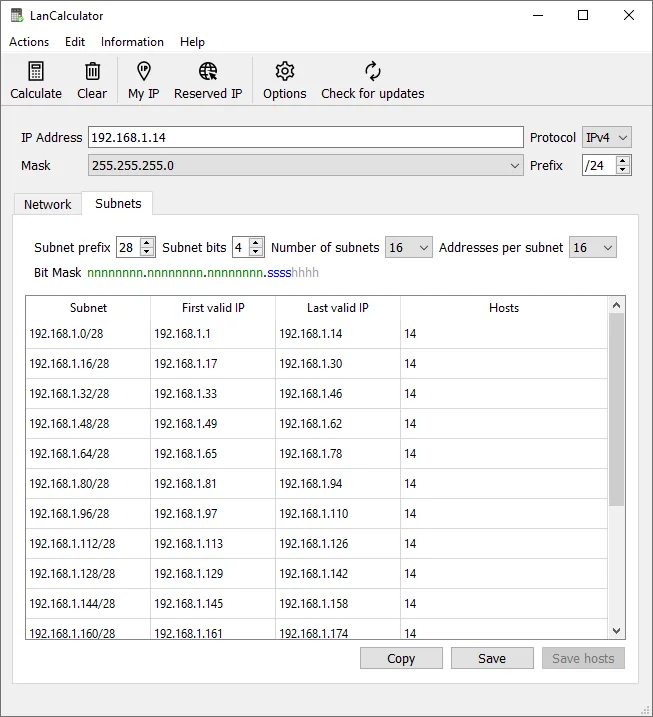
The planning side is what separates it from a web calculator. Since version 2.0 (2019) it includes subnet planning: you take a parent network and split it into subnets, then export either the list of subnets or the list of IP addresses within each subnet. For IPv6 it handles both expanded and compressed notation, so 2001:db8:0:0:0:0:0:1 and 2001:db8::1 are treated as the same thing. It also detects local IP addresses automatically from the machine’s network adapters, which gives you a starting point without typing.
The current version at the time of writing is 22.01, released January 15, 2022. That release added digital signatures to the install package and executable files and moved to Qt 6.2.2. The vendor lists support for Windows Server 2012 R2, Windows 10, Server 2016, Server 2019 and Windows 11, with modest requirements (1 GHz CPU, 512 MB RAM, 50 MB disk). The package is a 32-bit build of about 60 MB.
Where it’s strong
- Offline and local. It runs on the admin workstation with no web service involved, so you can plan addressing for a sensitive site without pasting internal ranges into a browser tool.
- Split and export. Carving a /23 into a /25 for staff, /26s for voice and cameras and /27s for the rest, then exporting the lists, is exactly the task it is designed for. Our guide on splitting a /24 into per-VLAN subnets shows the method.
- IPv6 alongside IPv4. If you are starting dual-stack planning with a /48 or /56 from your ISP, having both families in one tool helps.
- Number base display. Seeing the mask in binary is still the fastest way to teach a junior tech why a /27 has 30 usable hosts.
- Signed binaries. Since 22.01, the executable and package carry a digital signature, which makes verification straightforward.
Where it comes up short, and who should leave it in the drawer
Think of it as a calculator rather than an IPAM system. Nothing in it tracks allocations over time, reserve addresses, pull DHCP leases or integrate with DNS servers. Once your plan is exported, the source of truth moves to a spreadsheet, NetBox, phpIPAM or whatever your team uses.
Development is slow. The last release was 22.01 in January 2022, and before that the product went from 2006 to 2019 without a new version. That does not make the maths wrong, since subnetting has not changed, but it does mean no new features should be expected on a predictable schedule.
It is Windows only, and it is a GUI tool: there is no documented command-line mode for scripting. If you already live in PowerShell or Python, the ipaddress module (ipaddress.ip_network('10.20.30.0/23').subnets(new_prefix=26)) or a small script may be faster for bulk work. The vendor does not publish a SHA-256 hash on the product page, so you rely on the Authenticode signature rather than a checksum.
Skip it if you need multi-user address management, or if you work on macOS or Linux.
Who it suits
Network and systems admins in small and mid-size organizations who plan VLANs a few times a year and want a reliable, local tool that produces exportable lists; trainers and team leads who teach subnetting; anyone preparing a change request that needs a clean table of subnets, gateways and ranges.
Licensing and cost
At the time of writing, the vendor offers a Personal License that is free for non-commercial use and a Business License at US$49.95 per machine, which includes one year of updates and support. As with the vendor’s other products, the licence is counted per machine where it is installed, so two admin laptops need two business licences. For a tool you use at work, the personal licence does not apply. Check the vendor’s current pricing page before purchasing, since prices and bundle options can change.
How it compares
The obvious alternatives are free: web subnet calculators, the Python ipaddress module, or ipcalc on Linux. They cover the maths; LanCalculator adds a desktop GUI, IPv6 handling in the same view and export of planned subnets. Within this site, it pairs naturally with LizardSystems Network Scanner, whose range input benefits from a clean plan, and with Angry IP Scanner for confirming what is actually alive in each new subnet after cut-over. For verifying traffic on a freshly created VLAN, Wireshark is the follow-up. See the wider list in Diagnostic & Planning Utilities.
Getting it safely
Obtain LanCalculator only from lizardsystems.com. The vendor does not show a SHA-256 on the product page, but since version 22.01 the files are digitally signed, so check the signature before running:
Get-AuthenticodeSignature .\<package-name>.exe | Select-Object Status, SignerCertificateA Valid status with the vendor’s certificate is what you want. Avoid shareware mirrors that may repackage older, unsigned builds. The where to get it page lists the general steps.
FAQ
Does LanCalculator support IPv6?
Yes. The vendor states support for all IPv6 formats, including expanded and compressed notation, and subnet planning has supported IPv6 since version 2.0.
Can it export subnet plans?
Yes. It can create and export a list of subnets and a list of IP addresses in each subnet.
Is it free for use at work?
The free licence is for personal, non-commercial use. Use at a business requires a Business License, US$49.95 per machine at the time of writing.
Does it run on Windows 11?
Yes — LizardSystems lists Windows 11 as supported, alongside Windows 10 and Server 2012 R2 through 2019.
Is it still maintained?
The latest release is 22.01 from January 2022. It is functional, but updates are infrequent.