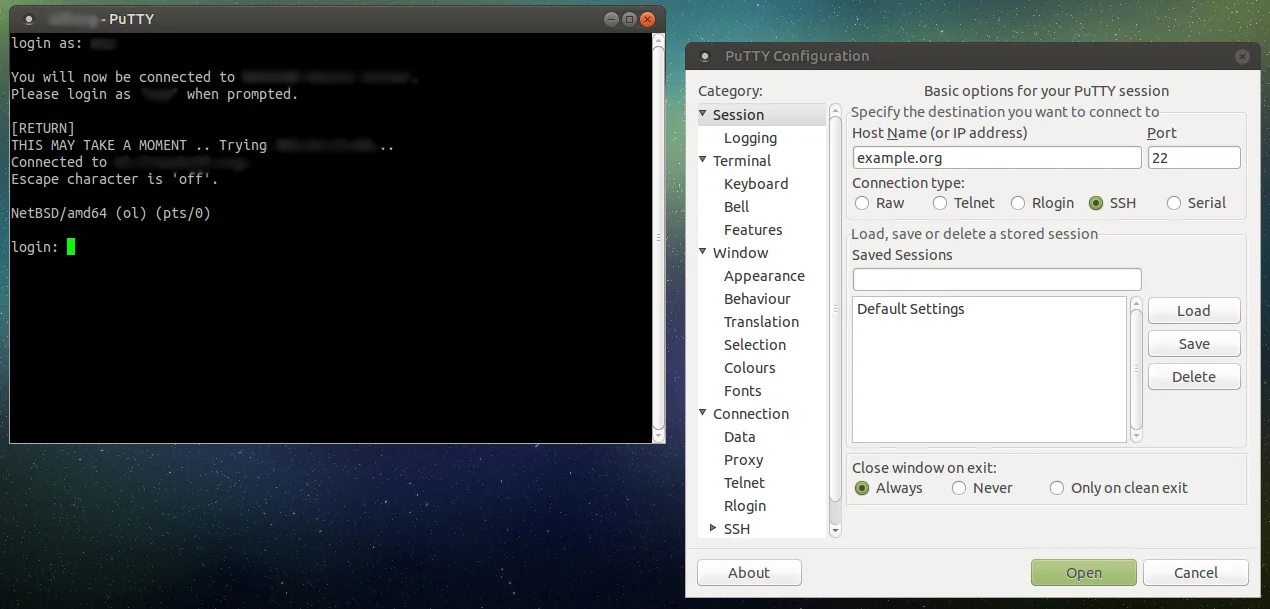
The core switch has dropped off the management VLAN, and the only way in is the blue console cable plugged into COM3 on a laptop balanced on a UPS. Ten minutes later you need SSH to the firewall, and after that, Telnet to a legacy PDU that never learned anything newer. Windows now ships an OpenSSH client, but it does not speak serial and it does not do Telnet. That is why PuTTY is still on nearly every Windows admin’s machine: one small, free program that handles SSH, Telnet, rlogin, raw TCP and serial lines, with saved profiles for each device.
What it does
PuTTY is a free implementation of SSH and Telnet for Windows and Unix platforms, written and maintained by Simon Tatham and a small group of contributors, with an xterm-style terminal emulator. The Windows distribution includes several programs:
- putty.exe — the GUI terminal for SSH, Telnet, rlogin, raw sockets and serial (
COM1,COM3, etc., with baud, data bits, parity and flow control). - pscp.exe and psftp.exe — command-line SCP and SFTP clients.
- plink.exe — a command-line connection tool for scripts, for example
plink -batch -ssh admin@10.0.0.2 -i C:\keys\netops.ppk "show running-config" > core.txt. - pageant.exe — an SSH agent that holds decrypted keys in memory so sessions and plink calls authenticate without prompting.
- puttygen.exe — key generation and conversion between PuTTY’s
.ppkformat and OpenSSH keys. - puttytel.exe — a Telnet-only build for places where SSH is not wanted.
Saved sessions store host, port, protocol, username, key file, terminal settings, logging and tunnels. Port forwarding covers local (-L), remote (-R) and dynamic SOCKS forwarding, which is how many admins reach a web UI on an isolated management network through a jump host.
The current release at the time of writing is 0.85, dated August 16, 2026. It is a security release: the change log lists a remotely triggerable use-after-free in Pageant, buffer overflows in OpenSSH encrypt-then-MAC modes and private key decryption, and denial-of-service fixes. Version 0.84 (May 2026) fixed a double-free in RSA key exchange, and 0.83 (February 2025) added ML-KEM post-quantum key exchange. The project publishes MSI packages for 64-bit x86, 64-bit Arm and 32-bit x86, standalone executables for each tool, and a Microsoft Store listing.
Where it’s strong
- Serial console. For switches, routers, firewalls and UPS management cards, PuTTY’s serial support is the reason it has not been replaced.
- Saved sessions per device. A named session per switch, with the right key, username and logging path, turns “which IP was the stack in building B?” into a double-click. The guide on saved PuTTY sessions and keys for switches and routers shows a sensible layout.
- Session logging. Logging everything printed to a timestamped file (for example
&H-&Y&M&D-&T.log) gives you a change record for each maintenance window. - Small, fast and patched. It starts instantly, needs no runtime and has a long record of prompt security fixes.
- Plink for automation. Pulling configs from a dozen devices with a batch loop is practical, as long as the devices accept non-interactive commands.
Where it comes up short, and who should leave it in the drawer
The interface has barely changed in two decades. There are no tabs, and session management happens in one small dialog with a tree of settings. Settings live in the registry under HKCU\Software\SimonTatham\PuTTY\Sessions, which makes sharing a session library across a team clumsy; people export .reg files or use third-party wrappers.
Its key format is its own. .ppk files need converting with PuTTYgen to use them with OpenSSH, and vice versa; mixing both ecosystems on one laptop is a common source of “why is my key refused” tickets. Pageant and the Windows OpenSSH agent are separate, too.
If you are already comfortable with Windows Terminal plus the built-in ssh.exe and never touch serial or Telnet, PuTTY adds little. And it is not a file manager: for dragging configs and logs between a Windows box and a Linux server, WinSCP is the better fit.
Who it suits
Network admins who handle switches, routers and appliances; Windows admins who SSH into a handful of Linux servers; anyone who needs serial console access from a laptop. It is also a sensible standard for helpdesk machines because its behaviour is predictable and it is easy to deploy by MSI.
Licensing and cost
PuTTY is free and released under the MIT licence, which permits use, modification and redistribution for any purpose, including commercial use, provided the copyright notice is retained. There is no paid tier, no support contract and no per-seat cost, so deploying it to every admin laptop costs only the patch cycle. For the definitive text, read the licence page on the vendor’s site.
How it compares
PuTTY and WinSCP are complementary rather than competing: PuTTY is the shell, WinSCP is the file mover, and WinSCP can import PuTTY’s saved sessions and open a PuTTY terminal for the current connection. Our PuTTY vs WinSCP page explains where each one belongs. For finding the device before you connect, Angry IP Scanner or Advanced IP Scanner will list hosts with port 22 open. More tools of this kind sit under SSH, Telnet & File Transfer.
Getting it safely
Get PuTTY only from the author’s site at chiark.greenend.org.uk (linked from putty.org) or the Microsoft Store listing the author points to. Because PuTTY handles credentials, tampered copies on look-alike sites have been a recurring problem. The author publishes SHA-256 checksums and GPG signatures for every file. Check the hash:
Get-FileHash .\<putty-0.85-package>.msi -Algorithm SHA256Compare it with the vendor’s sha256sums file, and verify the GPG signature with the release key published on the Keys page if your process requires it. See where to get it for the general routine.
FAQ
Is PuTTY still needed now that Windows has OpenSSH?
For plain SSH, the built-in client is fine. PuTTY remains useful for serial consoles, Telnet to legacy gear, saved per-device sessions and Pageant-based key handling.
How do I use an OpenSSH key with PuTTY?
Load the OpenSSH private key in PuTTYgen and save it as a .ppk. Point the session at it under Connection → SSH → Auth → Credentials.
Where does PuTTY store saved sessions?
In the Windows registry under HKCU\Software\SimonTatham\PuTTY\Sessions. Export that key to back sessions up or move them to another machine.
Should I update to 0.85?
Yes. It fixes several security issues, including a remotely triggerable flaw in Pageant.
Can PuTTY transfer files?
Not in the GUI. Use pscp or psftp from the same package, or WinSCP for a graphical file manager.